Image LoRA Guide (for Text to Image & Reference-To-Image & Image Editor)
Learn about both types of LoRAs in ZenCreator — SDXL body-shape LoRAs and Flux Klein style-template LoRAs — and how to use each.
Written By Arina
Last updated About 4 hours ago
What is a LoRA?
LoRA (Low-Rank Adaptation) is a compact add-on trained to nudge a base model toward a specific look, body shape, style, or concept — without retraining the whole model.
ZenCreator offers two different kinds of LoRAs, and they work in very different ways:
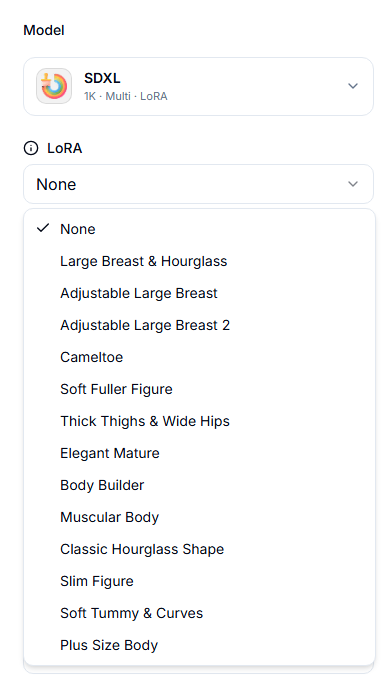
SDXL Body-Shape LoRAs (Text to Image & Reference-To-Image) — a prompt-level add-on that nudges body shape, proportions, or physique. You attach up to 3 at once and control each one's strength. Covered in Part 1 below.
Flux Klein Style LoRAs (Image Editor) — ready-made style templates. You upload your own photo, and the LoRA transforms it to match the template's look. Covered in Part 2 below.
Part 1: SDXL Body-Shape LoRAs
Why use LoRAs?
Precision control over physique, age cues, or stylistic traits.
Consistency across a batch or series (e.g., keep the same body shape across outfits).
Modularity: mix different, compatible traits without hard-coding them into the prompt.
How LoRA strength works
Range:
0.1 → 3.0 per LoRA (default 0.8).
0.1–0.4 = subtle hint;
0.5–1.2 = balanced control (recommended);
>1.5 = aggressive and likely to introduce artefacts (warping, seams, texture glitches).
When stacking multiple LoRAs, lower individual strengths (e.g., 0.6–0.9 each).
If you see artefacts, drop a LoRA or reduce strengths in 0.1–0.2 steps and simplify the prompt.
Using multiple LoRAs
You can apply up to 3 at once.
Prefer complementary combinations (e.g., Soft Fuller Figure + Thick Thighs & Wide Hips).
Avoid contradictory pairs at high strength (e.g., Slim Figure + Plus Size Body). If you must combine opposites, keep each ≤0.6 and let the prompt decide the balance.
Order doesn’t matter; strengths do.
Provider choice (quick rule)
WAN: most photoreal and detailed; no LoRA support.
SDXL: flexible and supports LoRAs. Choose SDXL whenever you need body/shape/style control.
LoRA catalog (intent & usage)
Each line explains what the LoRA is for, when to use it, and any notes. The aliases in parentheses map to your internal packs, so your team knows the source.
Large Breast & Hourglass
Emphasises fuller breasts with a classic hourglass silhouette. Great for “bombshell” aesthetics.
Tip: Pair with Classic Hourglass Shape at low strength if you need stronger waist definition.
Adjustable Large Breast
Breast emphasis with a different learned bias than v2; use when the first option under- or overshoots.
Tip: Start at 0.6–0.9 and tune in 0.1 steps.
Adjustable Large Breast 2
Alternative slider trained specifically for SDXL; try this if the above conflicts with outfit/pose.
Tip: You can combine 2 LoRAs for Breast to achieve giant results.
Cameltoe
Enforces tight garment fabric tension in the groin area (swimwear/activewear shots).
Tip: Keep ≤0.8 to avoid unnatural seams.
Soft Fuller Figure
Adds overall softness and fuller fat distribution. Natural look when combined with lifestyle prompts.
Tip: Works well with Soft Tummy & Curves.
Thick Thighs & Wide Hips
Stronger lower-body emphasis and wider hip line.
Tip: Pair with Classic Hourglass Shape for dramatic waist-to-hip contrast.
Plus Size Body
Plus-size proportions across torso and limbs.
Tip: Don’t combine with Slim Figure above ~0.5 each—pick one or keep both very low.
Soft Tummy & Curves
Visible belly softness and gentle curves.
Tip: Great for candid beach/lifestyle scenes; avoid aggressive sharpening in Upscale.
Elegant Mature
Mature facial cues and styling.
Tip: Pair with Classic Hourglass Shape or Athletic Tone depending on the vibe.
Athletic Tone
Toned physique with low-to-moderate body fat.
Tip: Combine with Slim Figure for a leaner look; keep both around 0.6–0.9.
Strong Muscular Body
Clearly muscular build and definition.
Tip: Works with studio/fashion lighting prompts; too high strength can harden faces — balance with neutral skin prompts.
Slim Figure
Slender proportions with minimal body fat.
Tip: Don’t overdo; >1.2 may cause limb thinning artefacts.
Classic Hourglass Shape
Tight waist with balanced bust/hip line.
Tip: Pairs well with Large Breast & Hourglass at modest strengths.
Triple Breast
Fantasy/anatomical variation for creative shoots.
Tip: Keep other body LoRAs low to avoid conflicts.
Best-practice workflow with LoRAs
Write the core prompt (subject, camera, lighting, mood).
Pick SDXL and add 1–2 LoRAs at 0.7–0.9 each.
Add a negative prompt for anatomy issues (e.g., “extra limbs, deformed, bad hands, distorted proportions, watermark”).
Generate 4–8 images, review artefacts, and adjust strengths by ±0.2.
When satisfied, run larger batches.
Finalise with Upscaler (for detail) and Head & Face Swap last if you need a specific identity.
Prompting tips with LoRAs
Keep trait words in the positive prompt so the LoRA has context (e.g., “editorial fashion, hourglass figure”).
Don’t fight your LoRA with contradictory text (“slim figure” + Plus Size Body).
Use clean lighting and camera terms; messy prompts amplify artefacts.
Can you combine LoRAs?
Yes — up to three. Combine complementary traits and keep strengths moderate. If the result looks “pulled in different directions,” remove one LoRA or let a single LoRA lead at ~0.9 while the others sit at ~0.4–0.6.
Quick troubleshooting
Anatomy glitches / seams → lower strengths; remove a conflicting LoRA; simplify the prompt.
Look not strong enough → raise one LoRA gradually (e.g., 0.8 → 1.0) rather than stacking more.
Soft/low detail → route to Upscaler.
Identity mismatch → finish with Head & Face Swap as the final step.
Example starter settings
Lifestyle hourglass: SDXL + Classic Hourglass Shape 0.8 + Large Breast & Hourglass 0.6.
Athletic editorial: SDXL + Athletic Tone 0.9 + Slim Figure 0.6.
Plus-size fashion: SDXL + Plus Size Body 0.9 + Thick Thighs & Wide Hips 0.7.
Part 2: Flux Klein Style LoRAs
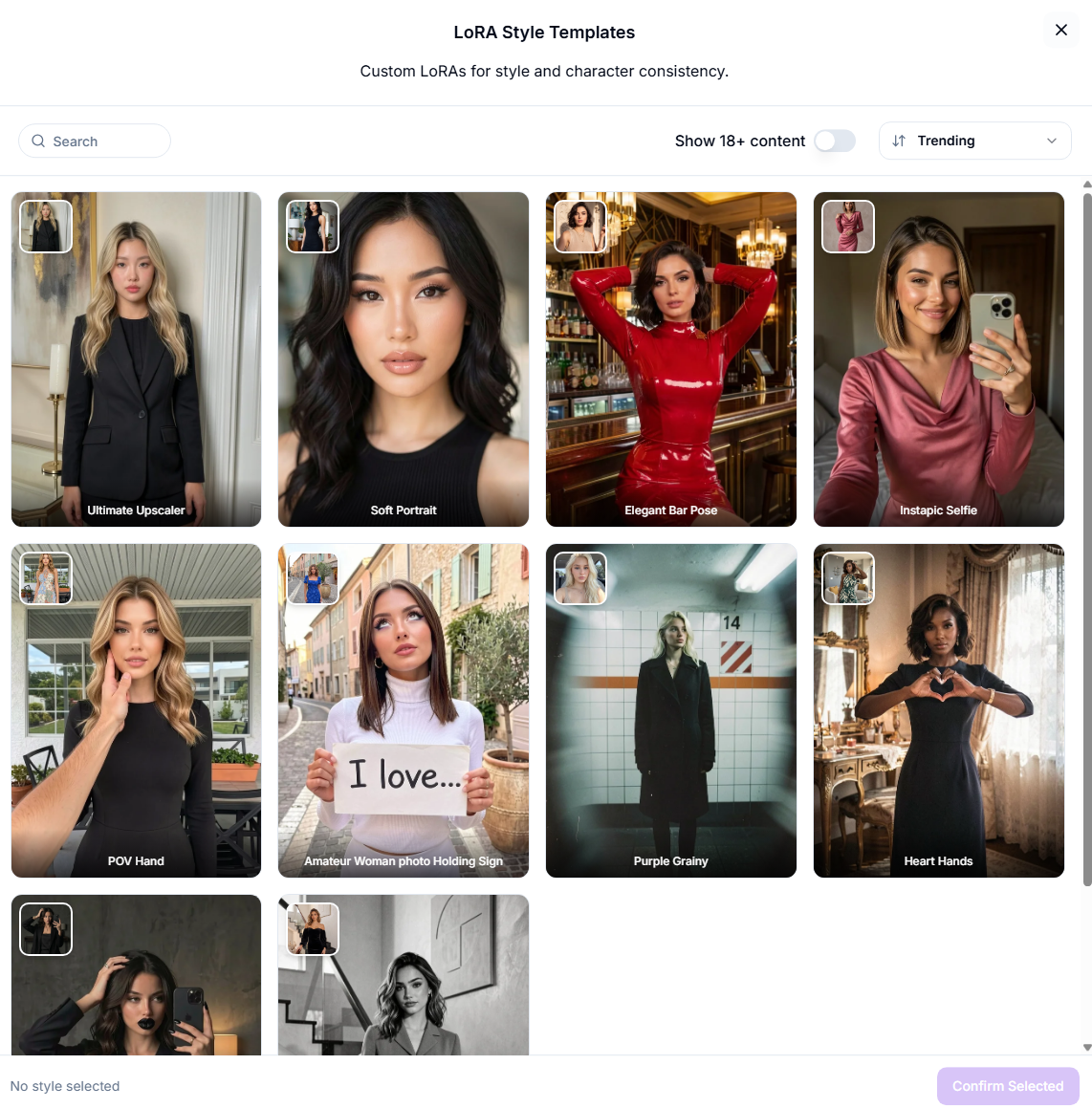
Flux Klein LoRAs work completely differently from SDXL body-shape LoRAs. Instead of nudging a text-to-image generation, they're style templates: you upload your own photo, pick a Flux Klein LoRA, and the tool transforms your photo to match that template's look — pose, styling, and overall aesthetic.
How it works
Open Image Editor and select the Flux Klein LoRA model.
Upload the photo you want to transform.
Pick a LoRA style template from the list.
Generate — the result follows the template's look while carrying over your subject.
How this differs from SDXL Body-Shape LoRAs
Tips
Use a clear, well-lit photo with the subject fully visible — the template works best when it has a clean source to transform.
Results follow the template's composition, so if you need a specific pose or crop, pick a template whose example already matches it.
Was this helpful?
Still need help? Ask the team