AI Prompt Assistant
让 AI Prompt Assistant 把粗略的想法变成可直接使用的视频提示词,已在 Text to Video、Image to Video 和 Video to Video 中上线。
最后更新 大约 6 小时前
不知道提示词该怎么写?打开内置聊天,用你自己的话(任何语言都可以)描述你想要的画面,就能得到一段可以直接放进 Prompt 框的结构化英文提示词。
1. AI Prompt Assistant 是什么
你不需要了解提示词语法、关键词技巧或正确的结构。助手会根据你输入的内容和当前工具的设置,自动帮你完成措辞。
它是 Prompt 框正下方的一个按钮,已在三个工具中上线:
Text to Video
Image to Video
Video to Video
免费使用
与 AI Prompt Assistant 聊天从不消耗 Credits,只有在生成视频本身时才会消耗 Credits。
2. 如何打开
点击 Prompt 框正下方的"» AI Prompt Assistant"。生成设置旁会打开一个聊天面板,你可以在其中描述想法,并实时看到结果逐步生成。
3. 如何使用
描述你的想法。 用你自己的话和语言输入你想看到的画面,例如 "beautiful girl dancing"。
引用已上传的图片(可选)。 如果你已经为 Image to Video 或 Video to Video 上传了参考图片,助手会为它添加标签(例如
[img1]),这样你就可以在消息中直接引用它。助手生成提示词。 它会写出一段完整的结构化英文提示词,并根据当前工具设置(时长、分辨率和风格)自动调整。
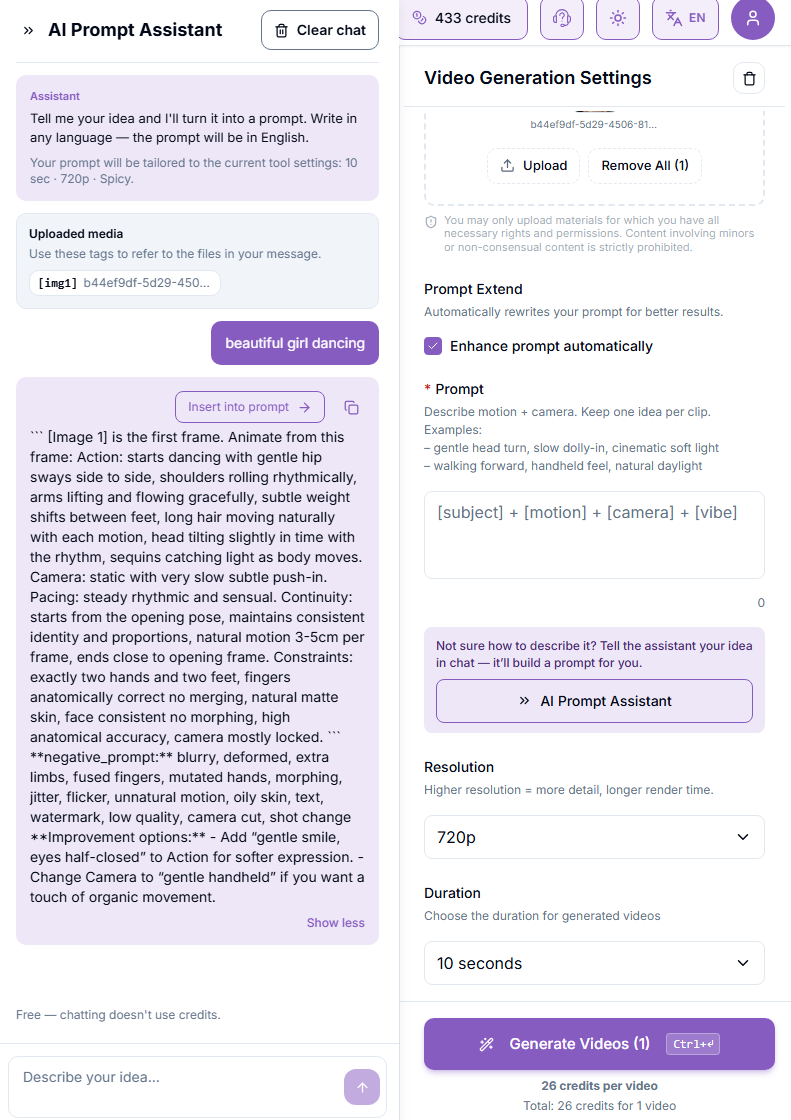
插入或复制。 点击"Insert into prompt"可将结果直接插入 Prompt 框,或使用复制图标手动获取文本。
如有需要可以编辑,然后照常生成。
4. 生成的提示词包含什么
一次典型的回复通常包含:
主提示词:动作、镜头运动、节奏和连贯性,写成一个结构化的整体
负面提示词:需要避免的常见问题,例如变形、伪影或不需要的动作
改进建议:可选的调整,例如改变表情或镜头风格
已根据你的设置调整
助手已经了解你的时长、分辨率和风格,不需要在消息中重复说明。部分模型提供 Style 下拉菜单,可选择预设风格(Cinematic、Anime Action、Product-360 等),助手会匹配你选择的风格。
你可以直接使用结果、应用某个建议的调整,或在同一个聊天中要求修改。
5. 结果示例
1. 我的描述
"Sexy dancing"
2. 生成的提示词
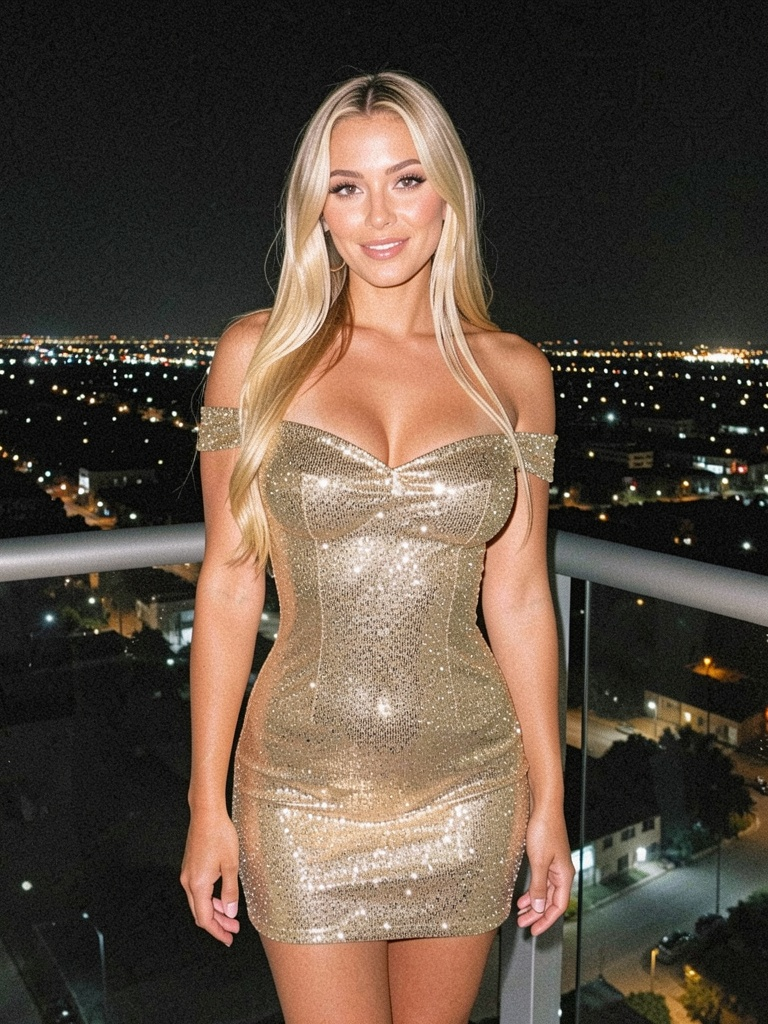
SEEDANCE 2.0 PROMPT — Cinematic, 10s, 9:16, 720p SCENE: Nighttime luxury balcony overlooking a sprawling city with dense lights. Foreground: woman in tight gold sequined dress. Mid-ground: glass railing and city glow. Background: distant illuminated skyline. Depth of field: f/2.0 shallow, strong subject-background separation. CHARACTER / REFERENCES: Blonde woman in shimmering gold off-shoulder sequined mini dress — [Image 1] for face, body, hair and costume reference, maintaining consistent subject throughout, strictly match reference. [0:00–0:02] HOOK Visuals: Extreme close-up on sequined bust and cleavage catching city light, then snap to full-body reveal Action: Woman begins slow hip roll, shoulders rolling seductively toward camera Camera: Snap zoom from tight macro to full-body in 0.3s, no easing, subject centered Audio: 0–1.2s silence, at 1.3s deep low bass hit synced to zoom Transition: hard cut [0:02–0:03.5] ESTABLISH Visuals: Full figure on balcony, dress sequins sparkling under night lights Action: Slow sensual body wave, hands sliding down hips Camera: Dolly forward at 1.5 ft/s, subject remains frame-center Audio: Ambient city hum -4dB, subtle electronic music bed enters -2dB Transition: smooth [0:03.5–0:06] FIRST ACTION Visuals: Dress catching light with every movement, hair swaying Action: Sexy dance — rhythmic hip circles and shoulder rolls, weight shifting side to side Camera: Gentle 8-foot orbit counterclockwise at 15°/s, 3-foot distance Audio: Music pulse builds, light foley of fabric movement Transition: none [0:06–0:08.5] ESCALATION Visuals: Sequins flashing intensely with faster movement Action: Dance intensifies — deeper hip rolls, arms raised, torso undulation Camera: Slow push-in 0.2x speed over 2.5s, slight breathing drift Audio: Music swells, bass hits on every major movement Transition: none [0:08.5–0:10] CLIMAX + RESOLUTION Visuals: Final seductive pose, body angled, eyes locked on camera Action: Slow final hip roll into held pose, slight hair flip Camera: Lock-off static, subject center, slight 2s linger Audio: Music peaks then fades under city ambience Transition: hold LIGHTING: Three-point cinematic — warm 3000K key at 45° left (100%), cool 5600K fill at 33% from right, rim light from city behind at 60%. COLOR GRADE: Teal & orange — shadows toward cyan-teal (200° hue), highlights warm gold-orange (30° hue), midtones neutral, slight highlight rolloff on sequins. AUDIO DIRECTION: Low electronic track at 80 BPM enters at 1.3s, bass hits synced to body movement, ambient city tone at -4dB throughout. CONSTRAINTS: no text, no logos, no extra people, no camera moves faster than 2 ft/s or 20°/s, saturation under 140%, every frame has visible motion or light play on sequins.3. 参考图片
4. 最终结果
6. 小贴士
描述越清晰,结果就越精确。如果已经想好主体、动作和氛围,不妨都写进去。
如果结果不太理想,直接在同一个聊天里说明需要改什么即可,不必重新开始。
接下来可以看看
这有帮助吗?
仍需要帮助? 咨询团队