Companion
A chat that writes expert prompts for you and generates photos and videos right inside the conversation.
Written By Arina
Last updated About 2 hours ago
What it does
Companion is one chat where you can talk, create, and edit — describe what you want in plain words, and it writes the expert prompt and generates the result right in the conversation. From the chat you can:
Just talk — chat about anything, no generation needed
Create any image or video — generate all content from a description, including NSFW
Edit photos — edit an existing photo you upload
Use templates — start from a ready-made template
Prompt help & account — get prompting tips or manage your account
Your step-by-step guide
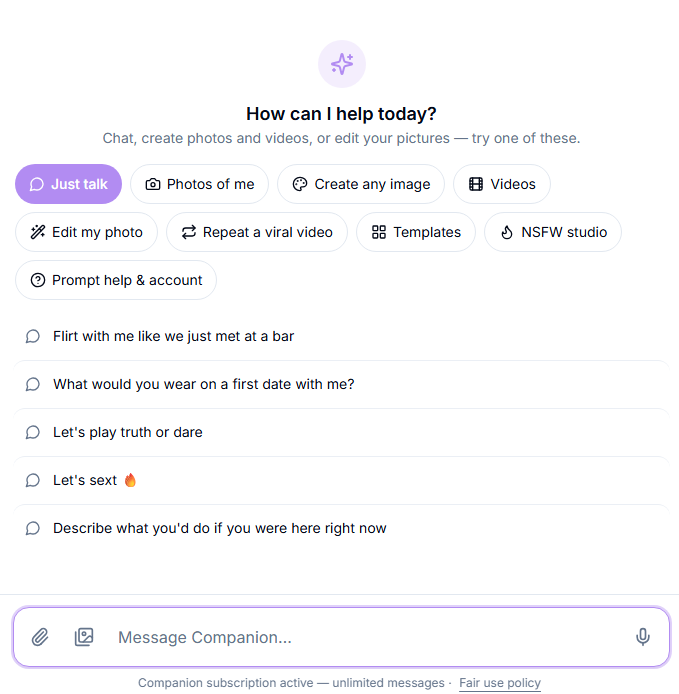
Step 1. Open Companion. Go to the Chat tab in the app.
Step 2. Describe what you want in plain words. No need to write a formal prompt — just say what you're picturing, and Companion turns it into an expert prompt for you.
Step 3. Get your result right in the conversation. Photos and videos are generated and shown directly in the chat — no need to switch to a separate tool.
Step 4. Keep talking. Companion can hold a conversation about any topic, not just generation requests.
Step 5. Find past chats anytime.

Your previous conversations are listed on the left — click one to continue it, or start a New chat for something new.
Settings
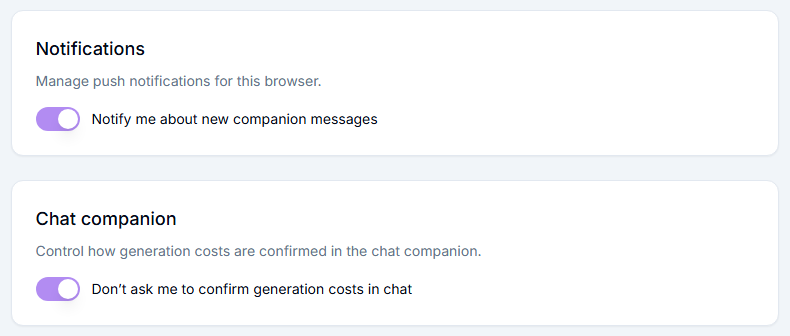
Two Companion-specific settings are available in your account settings:
Notify me about new companion messages — manage push notifications for this browser.
Don't ask me to confirm generation costs in chat — turn this on to skip the cost confirmation step and generate faster.
Pricing
The Companion subscription currently costs $19.99/month and covers unlimited text messages. It does not cover media generation — photos and videos are billed at your normal credit rates, same as any other tool. You can cancel anytime from your billing settings.
Pro tips
You don't need to write a polished prompt — describe the idea loosely and let Companion do the expert phrasing.
Ask Companion to refine or tweak a result conversationally, the same way you'd ask a person for changes.
Troubleshooting
Something broke or isn't working the way you expect? Contact us in the support chat in the app, or email [email protected].
Coming soon
Roleplay that plays along — set any scene, any mood. Companion will stay in character and match your pace.
A companion who remembers — your name, your inside jokes, and where last night's story left off.
FAQ
Does my subscription cover image and video generation?
Does my subscription cover image and video generation?
No. The subscription covers unlimited text messages. Generating photos or videos through Companion uses your normal credits, billed at standard rates.
Can I talk to Companion about things other than generation?
Can I talk to Companion about things other than generation?
Yes, Companion can hold a conversation about any topic, including 18+ topics.
Does Companion remember past conversations?
Does Companion remember past conversations?
Not yet — memory of your name, ongoing context, and previous conversations is planned but not live yet.
What's the difference between chat history and "a companion who remembers"?
What's the difference between chat history and "a companion who remembers"?
Chat history lets you reopen and continue a past conversation from the list on the left. It's not the same as memory — Companion doesn't yet recall details across separate conversations on its own; that's the "coming soon" feature above.
Can I create NSFW content in Companion?
Can I create NSFW content in Companion?
Yes, using the NSFW studio option — generation is billed at your normal credit rates like anything else.
Do images and videos generated in Companion get saved to My Generations, same as other tools?
Do images and videos generated in Companion get saved to My Generations, same as other tools?
Yes. Everything you generate in Companion is saved to My Generations, and also shows up inside the specific tool that made it.
Was this helpful?
Still need help? Ask the team