Pricing & Credits: Plans, Payment Methods, and Tool Costs
This guide explains how credits work in ZenCreator and the exact cost for every tool and flow.
Written By Arina
Last updated About 7 hours ago
ZenCreator uses credits — a simple way to pay only for what you generate (images, videos, upscales, swaps, etc.).
This article explains:
What credit packs we offer (and what you get)
How you can pay
Payment safety & security
Refund policy (including failed generations)
Free trial policy
Full tool & model cost list
Credit History
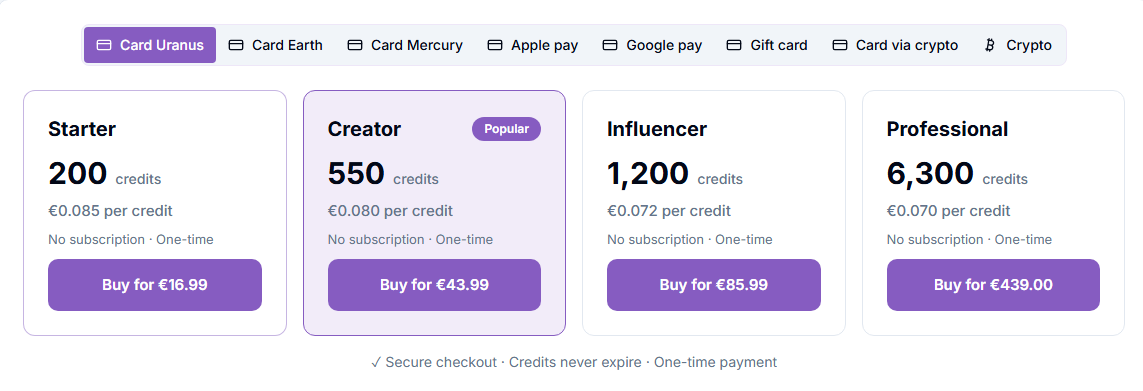
Credit Packs (Current Plans)
You can purchase credits in Billing Page.
Notes
Credits can be spent across any tools (image/video/upscale/etc.).
Prices above may not apply to all payment providers.
Some providers charge higher fees, so prices can differ — check the exact price on the Billing Page.
Taxes may apply. Prices/bonuses can change — the in-app Billing Page is the source of truth.
Payment Methods
You can pay by card, Apple Pay, Google Pay, Open Banking, Revolut, Gift card, Card via Crypto, or Crypto directly. The methods available to you depend on your region — you'll only see the ones connected for your account in Billing.
Prices can vary by payment method, because each payment provider charges its own fees — see the note under Credit Packs above.
1) Pay by Card
All payment methods named after planets are card payments: Card Uranus, Card Earth, Card Mercury, Card Jupiter, Card Venus, and Card Neptune (Indonesia only). Each one works through a different payment provider, so if your card doesn't go through with one, try another.
For step-by-step instructions, see How to Top Up Your ZenCreator Balance (Credits).
2) Apple Pay, Google Pay, Open Banking, and Revolut
Apple Pay and Apple Pay 2 both let you pay with Apple Pay — they go through different payment providers, so if one doesn't work, try the other. Google Pay is available too. In the UK, you can also pay via Open Banking — directly from your bank account. In Europe, Revolut is available.
3) Pay with a Gift card
Buy a gift card for the amount you need and paste its code into the support chat — credits are added to your account automatically once the code is validated. See How to Top Up Your ZenCreator Balance (Credits) for the full steps.
4) Pay by Card via Crypto
Pay with your card while the payment is processed through our crypto payment partner — your payment is automatically converted, and credits land on your account once it completes. You can pay with a credit card, Apple Pay, Google Pay, or Revolut Pay. You may be asked to verify your identity before payment — this usually takes about a minute.
5) Pay by Crypto directly
You can pay with USDT and USDC on these networks:
USDT
ERC-20
TRC-20
Polygon
USDC
ERC-20
Polygon
⚠️ Network matters. Sending USDT/USDC on the wrong blockchain network may result in a payment that cannot be processed automatically.
Payment Security & Safety
We take payment security seriously.
Card payments
Card payments are processed securely by our payment provider (limited list of supported countries). We do not store your full card details on our side.
Crypto payments
Always send the exact amount shown in the payment window.
Always select the same network in your wallet as you selected on the checkout screen (ERC-20 / TRC-20 / Polygon).
If you send less than the requested amount, the payment may not complete automatically.
Refund Policy (Credits)
See our full Refund Policy for complete terms. Summary below:
No refunds for used credits
Credits are consumed when generation/processing starts.
Used or partially used credit packs are non-refundable.
If you already generated content (or started processing), those credits can't be refunded.
Failed generations are refunded automatically
If something goes wrong on our side (e.g., a tool error / failed generation), the system automatically returns the credits to your balance.
If you believe a generation failed but you didn't get credits back, contact support and we'll check it.
Having trouble paying?
If your payment didn't go through, credits didn't appear, or crypto payment looks "stuck" — contact support and we'll help.
Use the in-app chat
Include details if possible: email, time, pack name, and for crypto the transaction hash
Tool & Model Costs (Credits)
Image-To-Video
Kling
Kling 2.1 Filters: ON 1080p 5s / 10s — 7 / 13 credits per video
Kling 2.5 Filters: ON 1080p 5s / 10s — 7 / 13 credits per video
Kling 2.6 + Audio Filters: ON 1080p 5s / 10s — 10 / 20 credits per video
Wan
Wan 2.5 + Audio Filters: Minimal Start Frame 480/720/1080p 5s — 5 / 10 / 15 credits per video
Wan 2.5 + Audio Filters: Minimal Start Frame 480/720/1080p 10s — 10 / 20 / 30 credits per video
Wan 2.2 + LoRAs Filters: Minimal Start Frame 720p 5s — 10 credits per video
Wan 2.6 + Audio Filters: Minimal Start Frame 720/1080p 5s — 10 / 15 credits per video
Wan 2.6 + Audio Filters: Minimal Start Frame 720/1080p 10s — 20 / 30 credits per video
Wan 2.6 + Audio Filters: Minimal Start Frame 720/1080p 15s — 30 / 45 credits per video
Wan 2.6 Ultra Fast Filters: Minimal Start Frame 720/1080p 5s — 5 / 7 credits per video
Wan 2.6 Ultra Fast Filters: Minimal Start Frame 720/1080p 10s — 10 / 14 credits per video
Wan 2.6 Ultra Fast Filters: Minimal Start Frame 720/1080p 15s — 15 / 21 credits per video
Wan 2.7 + Audio Filters: Minimal Start Frame 720/1080p 5s — 10 / 15 credits per video
Wan 2.7 + Audio Filters: Minimal Start Frame 720/1080p 10s — 20 / 30 credits per video
Wan 2.7 + Audio Filters: Minimal Start Frame 720/1080p 15s — 30 / 45 credits per video
Wan 2.2 Spicy Filters: Minimal Start Frame 720p - 10 / 13 credits per video
Wan 2.7 Spicy + Audio Filters: Minimal Start Frame 720p - 13 / 26 / 39 credits per video
Wan 2.7 Spicy + Audio Filters: Minimal Start Frame 1080p - 17 / 34 / 51 credits per video
Wan 2.7 + LoRa Filters: Minimal Start Frame 720p - 10/20/30 credits per video
Wan 2.7 + LoRa Filters: Minimal Start Frame 1080p - 15/30/45 credits per video
Wan 3.0 Spicy Filters: Minimal Reference Mode 480/720/1080p 5s — 15 / 30 / 50 credits per video
Wan 3.0 Spicy Filters: Minimal Reference Mode 480/720/1080p 10s — 30 / 60 / 100 credits per video
Wan 3.0 Spicy Filters: Minimal Reference Mode 480/720/1080p 15s — 45 / 90 / 150 credits per video
Wan 3.0 Spicy Filters: Minimal Reference Mode 480/720/1080p 20s — 60 / 120 / 200 credits per video
Wan 3.0 Spicy Filters: Minimal Reference Mode 480/720/1080p 25s — 75 / 150 / 250 credits per video
Wan 3.0 Spicy Filters: Minimal Reference Mode 480/720/1080p 30s — 90 / 180 / 300 credits per video
Wan 3.0 Prime Spicy Filters: Minimal Reference Mode 480/720/1080p 5s — 14 / 27 / 45 credits per video
Wan 3.0 Prime Spicy Filters: Minimal Reference Mode 480/720/1080p 10s — 27 / 53 / 90 credits per video
Wan 3.0 Prime Spicy Filters: Minimal Reference Mode 480/720/1080p 15s — 40 / 80 / 135 credits per video
Wan 3.0 Prime Spicy Filters: Minimal Reference Mode 480/720/1080p 20s — 53 / 106 / 180 credits per video
Wan 3.0 Prime Spicy Filters: Minimal Reference Mode 480/720/1080p 25s — 66 / 133 / 225 credits per video
Wan 3.0 Prime Spicy Filters: Minimal Reference Mode 480/720/1080p 30s — 79 / 159 / 270 credits per video
Seedance
Seedance Pro Fast Filters: Minimal Start Frame 480/720/1080p 5s — 2 / 4 / 7 credits per video
Seedance Pro Fast Filters: Minimal Start Frame 480/720/1080p 10s — 4 / 8 / 13 credits per video
Seedance Pro Filters: Minimal Start/End Frame 480/720/1080p 5s — 4 / 8 / 15 credits per video
Seedance Pro Filters: Minimal Start/End Frame 480/720/1080p 10s — 8 / 15 / 30 credits per video
Seedance Pro 1.5 Filters: Minimal Start/End Frame 720/1080p 5s — 8 / 16 credits per video
Seedance Pro 1.5 Filters: Minimal Start/End Frame 720/1080p 10s — 16 / 32 credits per video
Seedance Pro 1.5 Filters: Minimal Start/End Frame 720/1080p 12s — 20 / 40 credits per video
Seedance 2.0 Spicy — audio doesn't change the price
480p: 5s, 6s, 8s, 10s, 12s, 15s - 7/9/11/14/17/21 credits
720p: 5s, 6s, 8s, 10s, 12s, 15s - 16/19/25/31/37/46 credits
Seedance 2.0 Fast Spicy — audio doesn't change the price
480p: 5s, 6s, 8s, 10s, 12s, 15s - 6/7/9/11/13/17 credits
720p: 5s, 6s, 8s, 10s, 12s, 15s - 13/15/20/25/30/37 credits
Seedance 2.0 Mini Spicy — audio doesn't change the price
480p: 5s, 6s, 8s, 10s, 12s, 15s - 4/5/6/7/9/11 credits
720p: 5s, 6s, 8s, 10s, 12s, 15s - 8/10/13/16/19/23 credits
Seedance 2.5 Spicy — audio doesn't change the price
480p: 5s, 10s, 15s, 20s, 30s - 13/26/39/52/78 credits
720p: 5s, 10s, 15s, 20s, 30s - 29/58/87/116/174 credits
1080p: 5s, 10s, 15s, 20s, 30s - 100/199/298/397/595 credits
Grok
Grok Filters: Partial Start Frame 480/720p 6s — 12 / 18 credits per video
Grok Filters: Partial Start Frame 480/720p 10s — 20 / 30 credits per video
MiniMax
MiniMax H3 Max Filters: On — audio is always included and doesn't change the price
480p: 5s, 6s, 8s, 10s, 12s, 15s - 7/8/10/13/15/19 credits
720p: 5s, 6s, 8s, 10s, 12s, 15s - 10/12/16/20/24/30 credits
1080p: 5s, 6s, 8s, 10s, 12s, 15s - 20/24/32/40/48/60 credits
MiniMax H3 Max Turbo Filters: On — audio is always included and doesn't change the price
480p: 5s, 6s, 8s, 10s, 12s, 15s - 4/4/5/7/8/10 credits
720p: 5s, 6s, 8s, 10s, 12s, 15s - 5/6/8/10/12/15 credits
1080p: 5s, 6s, 8s, 10s, 12s, 15s - 10/12/16/20/24/30 credits
MiniMax H3 Max reference images — first 4 free per generation, then 0.5 credit each; if any reference video is attached, all images are billed.
Text-To-Video
Wan 2.2 Spicy 720p - 10 / 13 credits per video
Wan 2.7 Spicy 720p - 13 / 26 / 39 credits per video
Wan 2.7 Spicy 1080p - 17 / 34 / 51 credits per video
Wan 3.0 Spicy 480/720/1080p 5s — 15 / 30 / 50 credits per video
Wan 3.0 Spicy 480/720/1080p 10s — 30 / 60 / 100 credits per video
Wan 3.0 Spicy 480/720/1080p 15s — 45 / 90 / 150 credits per video
Wan 3.0 Spicy 480/720/1080p 20s — 60 / 120 / 200 credits per video
Wan 3.0 Spicy 480/720/1080p 25s — 75 / 150 / 250 credits per video
Wan 3.0 Spicy 480/720/1080p 30s — 90 / 180 / 300 credits per video
Wan 3.0 Prime Spicy 480/720/1080p 5s — 14 / 27 / 45 credits per video
Wan 3.0 Prime Spicy 480/720/1080p 10s — 27 / 53 / 90 credits per video
Wan 3.0 Prime Spicy 480/720/1080p 15s — 40 / 80 / 135 credits per video
Wan 3.0 Prime Spicy 480/720/1080p 20s — 53 / 106 / 180 credits per video
Wan 3.0 Prime Spicy 480/720/1080p 25s — 66 / 133 / 225 credits per video
Wan 3.0 Prime Spicy 480/720/1080p 30s — 79 / 159 / 270 credits per video
Seedance 2.0 Uncensored
Standard 480p
5 s, 6 s, 8s, 10 s, 12s 15 s - 7/9/11/14/17/21 credits
Standard 720p
5 s, 6 s, 8s, 10 s, 12s 15 s - 16/19/25/31/37/46 credits
Seedance 2.0 Fast — Text-to-Video
Standard 480p
5 s, 6 s, 8s, 10 s, 12s 15 s - 6/7/9/11/13/17 credits
Standard 720p
5 s, 6 s, 8s, 10 s, 12s 15 s - 13/15/20/25/30/37 credits
Seedance 2.0 Mini Spicy
Standard 480p
5 s, 6 s, 8s, 10 s, 12s 15 s - 4/5/6/7/9/11credits
Standard 720p
5 s, 6 s, 8s, 10 s, 12s 15 s - 8/10/13/16/19/23 credits
Seedance 2.5 Uncensored — audio doesn't change the price
480p: 5s, 10s, 15s, 20s, 30s - 13/26/39/52/78 credits
720p: 5s, 10s, 15s, 20s, 30s - 29/58/87/116/174 credits
1080p: 5s, 10s, 15s, 20s, 30s - 100/199/298/397/595 credits
Video-To-Video
Animate 480p / 720p — 7 / 13 credits per video
Replace 480p / 720p — 7 / 13 credits per video
Kling 2.6 — 10 credits per video (5 seconds)
DreamActor M2.0 720 — 5 credits + 1 credit per second
Seedance 2.0 Uncensored/Fast/Mini — the price is dynamic and is calculated using a formula based on the resolution and duration of not only the output but also the input video.
Wan 3.0 Spicy — also dynamic: credits = (output seconds + input video seconds, rounded up) × rate, where rate is 3 (480p), 6 (720p), or 10 (1080p) per second. Example: a 5s reference plus a 10s result = 15 billed seconds.
Seedance 2.5 Uncensored — also dynamic: credits = (output seconds + input video seconds) × rate, where rate is 1.54 (480p), 3.46 (720p), or 11.79 (1080p) per second, with at least 9 seconds billed. Example: a 5s reference plus a 5s result = 16 / 35 / 118 credits.
Video Upscaler
Price = quality mode × output resolution × video duration (output is 30 FPS).
Mode: Standard = base rate; Pro ≈ 10× Standard.
Resolution: 1080p ×1, 2K ×2, 4K ×4.
LipSync
General 1080p — 3 credits per second of audio
AI Video Merger
General — 1 credit / merge
Text to Image
General — 1 credit / image
Nano Banana 2 — 2 credits / image
Flux Klein Spicy — 2 credits / image
Seedream 5 — 1 credit / image
Seedream 5 Pro (1K) — 2 credits / image
Seedream 5 Pro (2K) — 3 credits / image
Qwen Image — 1 credit / image
Qwen Image Pro — 2 credits / image
WAN 2.7 Image — 1 credit / image
WAN 2.7 Pro — 2 credits / image
Krea 2 (1K) — 1 credit / image
Krea 2 (2K) — 2 credits / image
Z-Image Spicy (Standard) — 1 credit / image
Z-Image Spicy (Pro) — 2 credits / image
Image Editor
General 4K — 1 credit / photo
Nano Banana 2 — 4 credits / photo
Flux Klein Spicy — 1 credit / image
Seedream 5 — 1 credit / image
Seedream 5 Pro (1K) — 2 credits / image
Seedream 5 Pro (2K) — 3 credits / image
WAN 2.7 Image — 1 credit / image
WAN 2.7 Image Pro — 2 credits / image
Qwen Image — 1 credit / image
Qwen Image Pro — 2 credits / image
Flux Klein LoRA — 3 credits / image
Head & Face Swap
Only Face — 1 credit / image
Full Head Swap (with hair) — 1 credit / image
Full Head Swap (with hair) for unusual poses — 1 credit / image
Full Head and Face (New Beta) — 1 credit / image
Fast — MuleRouter — 1 credit / image
Seedream 5 Pro (1K) — 2 credits / image
Seedream 5 Pro (2K) — 3 credits / image
Image Upscaler
Basic upscale 4MP — 1 credit / image
Basic upscale 8MP — 2 credits / image
Basic safe face upscale 4MP — 1 credit / image
Basic safe face upscale 8MP — 2 credits / image
Premium — 2 credits / image
Premium safe face upscale 4MP — 2 credits / image
Premium safe face upscale 8MP — 2 credits / image
Ultra clarity 16Mp upscale — 2 credits / image
Ultra clarity 24Mp upscale — 3 credits / image
Ultra clarity 32Mp upscale — 4 credits / image
Natural clarity 16Mp upscale — 1 credit / image
SeedVR2 3B Base (2K / 4K / 8K) — 1 credit / image
SeedVR2 7B Premium (4K · 16MP) — 2 credits / image
SeedVR2 7B Premium (6K · 36MP) — 3 credits / image
Reference-To-Image
Seedream 5 Pro (1K) — 2 credits / image
Seedream 5 Pro (2K) — 3 credits / image
Krea 2 (1K) — 1 credit / image
Krea 2 (2K) — 2 credits / image
Photoshoot
General — 3 credits / photo
Face Generator
1K — 2 credits / photo
2K — 3 credits / photo
Variations
1K — 2 credits / image
2K — 3 credits / image
Collabs
General — 1 credit / photo
Seedream 5 Pro (1K) — 2 credits / photo
Seedream 5 Pro (2K) — 3 credits / photo
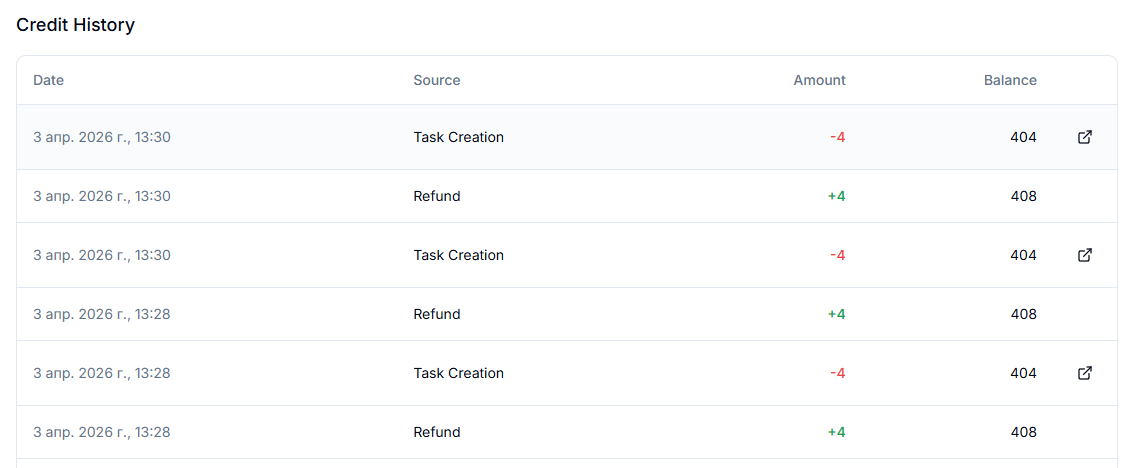
Pricing & Credit History
You can track your full credit history in the Billing section.
This includes all credit purchases, usage, and refunds.
Each transaction is recorded so you can clearly see how your credits are spent and when they are added to your balance.
FAQ
Do you have a free trial period?
Do you have a free trial period?
At the moment, we do not offer a free trial period or free onboarding credits. This change was introduced as part of recent platform updates and changes to our access policy. To start using the platform and unlock full access to the available features, you will need to purchase one of the credit packages. Once the purchase is completed, the credits will be added to your account, and you will be able to use the platform without trial limitations.
Do LoRAs change the price?
Do LoRAs change the price?
No — LoRAs don't change the per-image credit cost in Prompt/Ref tools.
Are video credits per image or per clip?
Are video credits per image or per clip?
Per video clip, depending on the selected video duration.
Where can I see the exact total before I pay credits?
Where can I see the exact total before I pay credits?
Under the Generate button for every tool — it shows per-item cost and the total for your batch.
What are credits?
What are credits?
Credits are ZenCreator's internal currency. You spend credits only when you generate or process content (images, videos, upscales, swaps, etc.).
Do credits expire?
Do credits expire?
No — credits do not expire.
Can I use one pack for any tool?
Can I use one pack for any tool?
Yes. All credits work across all ZenCreator tools and models.
Do you offer subscriptions?
Do you offer subscriptions?
No, at the moment we only offer credit packages.
Payments are charged once, you use your credits, and you can purchase more when needed.
Which cards do you support?
Which cards do you support?
We support Visa, Mastercard, and other major cards. Depending on your region and provider, you may also be able to pay with Apple Pay, Google Pay, PayPal, iDEAL, bank transfer, Alipay, WeChat Pay, and more. See Payment Methods above for details.
Why is my card payment not going through?
Why is my card payment not going through?
This may happen if the payment provider is not supported in your region, or your bank declined the transaction.
Try another card method in Billing — if none work, Card via Crypto or Crypto are good alternatives.
Which crypto do you support?
Which crypto do you support?
USDT: ERC-20, TRC-20, Polygon
USDC: ERC-20, Polygon
Why must I send the exact crypto amount shown?
Why must I send the exact crypto amount shown?
The payment is created for a specific exact amount (including rate + fees).
If you send less, the payment may remain incomplete and won't credit automatically.
Tip: copy the exact amount from the checkout screen (and don't "round" it).
I sent less crypto than required — what happens?
I sent less crypto than required — what happens?
In most cases:
The payment will not complete automatically
Depending on the payment state, you may be able to top up the missing amount while it's still active
If the payment expires, it may be canceled
If you're unsure, contact support with the transaction hash.
I paid with crypto — how long does it take?
I paid with crypto — how long does it take?
Usually it's credited automatically after the blockchain confirms the transaction.
Times depend on the network (and congestion), but it's typically a few minutes.
If it takes too long, contact support and include the transaction hash.
Can I get a refund for credits?
Can I get a refund for credits?
Used credits are non-refundable.
Partially used credit packs are non-refundable. Credits are consumed when generation or processing starts.
What if a generation fails — do I lose credits?
What if a generation fails — do I lose credits?
No. If a tool fails on our side, credits are automatically returned to your balance.
If you believe credits were not returned after a failure, contact support with:
your email
approximate time
tool name (and model if relevant)
Where can I see my credit usage?
Where can I see my credit usage?
You can view all your transactions, usage, and refunds in the Billing section.
Why was I charged but didn't receive credits?
Why was I charged but didn't receive credits?
This may happen if your payment is still being processed or under review.
Please wait a short time and check your balance again, or contact support if the issue persists.
I have a payment issue — how do I contact support?
I have a payment issue — how do I contact support?
Message us via the in-app chat.
For faster help, include:
your account email
payment method (Card/Crypto)
pack name
payment time
for crypto: transaction hash
Do you accept gift cards?
Do you accept gift cards?
Yes. Choose Gift card as your payment method in Billing: you buy a specific gift card and paste its code into the support chat. We don't accept gift cards you already own (e.g. Amazon, Steam).
Was this helpful?
Still need help? Ask the team